Problem with Turtles =(

Today, I am continuing with level design. It is really exciting to do these levels now because the game has more components in it – trapdoors and keys open up new ideas and possibilities. As you can see, I am currently developing level 34. The screenshot is actually an early level 34. The final level has much more stuff in it!

I actually have two phases of when I actually think about how to make the level. The first phase is when I first get the idea. When sketching, I seldom make levels complex – my ideas are rather rough sketches of a few platforms and puzzle elements. 

But when I actually get on to coding the level, the placement of the trapdoors and keys and such, I begin to add more elements to make the level more exciting. Usually when coding, I’m still thinking about the level design, and much of the time I’d have to think about how I would play the level as a player. For example, a level I’m designing now has a pair of PINK doors and a pair of BLUE doors. As the coder, I want to tell the player that pink doors are for the girl player, and blue doors are for the boy player. But then as I imagine myself playing it, I realise that it is possible that the player might think that the colour codes of the door simply tells where you will come out from when you enter it. And at that time, I put the two doors next to each other. Perhaps by coincidence, the player will not find out the actual purpose of me colour coding the doors. That’s why I’m now enhancing the level now to make sure that there is no room for error.

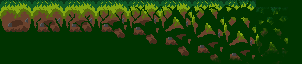
I’ve updated the trapdoor graphics to have that forest feel. When playing the game, look closer at the doors when they animate. The “leaves” will fall and the vines will snap! That was inspired when I thought copy and pasting the doors would be boring and I thought something else should take place when the doors open.

I was actually considering if I should make the metal trapdoors be a lump of thick vines instead, and the keys to be some sort of  “scissors” that will cut the vine, and the animation will play the scissors snapping the vines apart, thus “unlocking” it.

At the moment, I plan to make the keys less golden and have more grime and dirt, with mud stains on them to give it the forest feeling. The idea for making the keys and doors have a forest theme was an idea contributed by my friend Li Hao, who tests my game for me ^^ He’s my only tester actually =( and the rest of the people only tested the game once, which was when it was still in early development, having just a couple of levels.

Currently, I have one really tough problem that I cannot seem to solve:
– *Turtle characters are too small

My sprites are actually 10 x 20 each. That is really small! I don’t think you know this but, I never meant to have turtles as main characters in the game until it was pointed out to me that boxes (the original “characters”) were simply unacceptable, and it would be “disappointing” if I were to make the game have boxes as main characters.

The boxes did not have detail, so I thought a size of 20 x 20 was appropriate. It was only just a few days ago did I finally decide to draw and add the turtle animations. Since the turtles were standing up and took on a rectangular form, I cut the size to 10 x 20. THIS WAS A DISASTROUS MOVE.

I had simply too little space to draw the turtles. I drew them 16 x 32 instead. But the problem with using paint is that the game engine does not seem to be able to scale the graphics down properly because it’s made of pixels, which meant that all my graphics were SCREWED. I had to redo a 10 x 20 version of all my turtle animations, and keep the 16 x 32 version for when the turtle is bigger.

It really sucks to have those small graphics. It’s hard to draw and hard to see. Perhaps if I had planned to use turtles from the start, I may not have this problem now. I tried to enlarge the turtles now but the problem is that the platforms are 32 x 32. Enlarging the turtles to 16 x 32 means that while their feet are on the ground, their head would already be touching the ceiling! That makes it horribly hard for me to design subsequent levels because I have to leave a two-grid spacing. I don’t want the characters to look like they are so tall that they are made to squeeze through walkways that are just the same as their height! They also wouldn’t be able to jump with their heads touching the ceiling.

Other problems I face in the code:
– Player will overlap onto the blocks when they hold a directional key, and when they jump while overlapped, they will collide with the door above, as though there was an invisible ceiling

One possible enhancement (I have many, but I will just name the one which I think has the highest success rate for me to implement):
I thought of decorating the map with some cool objects, such as perhaps a tree with falling leaves, or grass that will sway, and putting these occasionally around the map to break the monotony of how everything seems so conformed to grids and how uniform everything appears to be.

My reflections (Note: not game-related)

As I am staring at my project, at all the codes, running the game and testing the things I just added, there are times when I can’t help but just stand up, walk around the house, look out the window, or enter my dark and silent bedroom. Then I’d come back and sit down before the computer, thinking about life again.

I think about the past, and of course I thought about the day when this idea came to my mind, the very day I told myself that I needed to make this game, and try my best to complete it.

It’s been two weeks of almost lifeless programming.

Have I achieved what I set out to achieve?


I also begin to wonder whether I will be able to finish this project at all. I’d say “Yes I can!”, but in one week’s time, school will start and we have to work on our Major Project.

I predict it to be a very stressful time when we have to really slog and put a lot of effort into. That is quite bad since I may not be able to work on my own project as much as I can now when the holidays still last.

I also start to think that perhaps I should have begun to realise that I should not have waited until my third year to start my own project. All this time, I had waited, thought that by the end of three years, I would be able to make my first working game!

I was wrong.


At the end of two years of school, I had come to a realisation. It was not a surprising one, but it was just something I had to accept.

Accept that even after another year of studying, I would not be able to make a game at all.


Maybe I should have started learning by myself sooner, perhaps…when I used to have more time, at least I could put the time to better use.

As if things aren’t bad enough, there is another distraction in July aside from Major Project. I’ve actually been looking forward and preparing for July (to play a game), but well…it seems that I might have to choose between working on this project, or playing the game which I have actually been anticipating for a few months. No doubt after waiting for so long, I would want to play…but now with this project in the way, I know that I have to sacrifice one thing, no matter what choice I make.

But back to flash games, I think this might probably be the only flash game I can create – the first, and only. It kind of saddens me a bit, because I actually had ideas for other games too, but at least I think if I were to choose any one game to make, I’d say I made the right choice of making Introvert. I have never had such a strong desire to create a flash game until I got the idea for Introvert. A desire so strong that it could make me so eager to see its completion.

I reflect endlessly as I work on this, the evening passes like a breeze, the nights turn into mornings, hours pass by swiftly that in just a few hours from now, when I look out my window, what I expect to be a black sky, would instead be a blue morning sky.

I guess that’s all for my reflections. Now…it’s back to coding.

Blocks and Keys!

Today, I got around to somewhat completing the key sprites and implemented the block opening sprites, both of which are now animated at 9 frames per second, which I think is the threshold for me and it also seems that 9 frames per second is something I should aim for since it seems to look rather smooth. I initially wanted the key to just hover up and down because that was easier, but then it meant that I had to change the sprite from 32 x 16 to 32 x 32. So I just stuck with this and did rotation, which is actually quite fun, and it also makes the key look a bit more 3D.

I had a problem with the blocks not disappearing after it was done opening but now it’s solved. I had to check if the animation was finished in update, then destroy the door. I also encountered a problem where if the character holds down the LEFT arrow key and bangs against a wall of doors, he will not be able to jump all the way up as though something were above him. This is a very irritating problem I face sometimes. I added a “repulsion” effect that will repel the player away from the blocks. The repulsion was weak at first and this made the player jitter (vibrate along the edge of the wall), but I made it stronger so he will actually rebound away when he bangs against the blocks. I don’t really like the rebound, but I think it looks better than having the character jitter.

Notice all my pictures never have a white background – that’s because I don’t have photoshop or any transparent tool >< which I hope to get soon so I can finally make all my sprites have a transparent background. Now I'm just making multiple versions with different background colours if I need them.

I am creating levels 30 and 31 today, and also hopefully within these two days, I will get to adding the actual turtle character, get its animations to work and make sure there are no bugs with the character. Now, my character is a a solid red rod!

Level Design

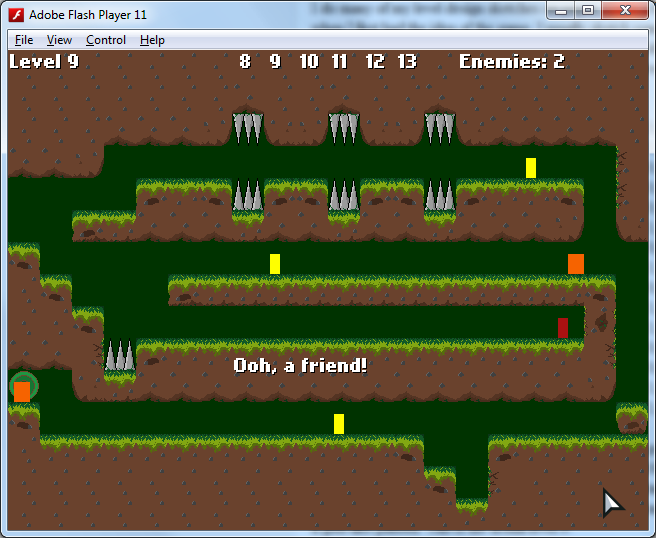
Level design is something I thought was easy, but I find it actually isn’t, especially when I have run out of ideas or the level does not make sense. I do many of my level design sketches on paper. Quite a few of my main initial levels were brainstormed when I first had the idea of the game. I usually sketch some level ideas when I’m bored and without the computer and sometimes on the bus. When I run out of ideas, I just randomly edit the level in the code and see what I can come up with. This is how level 9 is represented in the code.

data = new Array(
1, 1, 1, 1, 1, 1, 1, 1, 1, 1, 1, 1, 1, 1, 1, 1, 1, 1, 1, 1,
1, 1, 1, 1, 1, 1, 1, 1, 1, 1, 1, 1, 1, 1, 1, 1, 1, 1, 1, 1,
1, 1, 1, 1, 1, 1, 1, 0, 1, 1, 0, 1, 1, 0, 1, 1, 1, 1, 1, 1,
1, 1, 1, 0, 0, 0, 0, 0, 0, 0, 0, 0, 0, 0, 0, 0, 0, 0, 0, 1,
0, 0, 0, 0, 1, 1, 1, 0, 1, 1, 0, 1, 1, 0, 1, 1, 1, 1, 0, 1, //5
0, 0, 1, 1, 1, 1, 1, 1, 1, 1, 1, 1, 1, 1, 1, 1, 1, 1, 0, 1,
1, 0, 0, 0, 0, 0, 0, 0, 0, 0, 0, 0, 0, 0, 0, 0, 0, 0, 0, 0,
1, 1, 0, 0, 0, 1, 1, 1, 1, 1, 1, 1, 1, 1, 1, 1, 1, 1, 1, 0,
1, 1, 1, 0, 0, 0, 0, 0, 0, 0, 0, 0, 0, 0, 0, 0, 0, 0, 1, 0,
1, 1, 1, 0, 1, 1, 1, 1, 1, 1, 1, 1, 1, 1, 1, 1, 1, 1, 1, 0, //10
0, 0, 1, 1, 1, 1, 1, 1, 1, 1, 1, 1, 1, 1, 1, 1, 1, 1, 1, 0,
1, 0, 0, 0, 0, 0, 0, 0, 0, 0, 0, 0, 0, 0, 0, 0, 0, 0, 0, 0,
1, 1, 1, 1, 1, 1, 1, 1, 1, 1, 1, 1, 1, 0, 0, 1, 1, 1, 1, 1,
1, 1, 1, 1, 1, 1, 1, 1, 1, 1, 1, 1, 1, 1, 0, 1, 1, 1, 1, 1,
1, 1, 1, 1, 1, 1, 1, 1, 1, 1, 1, 1, 1, 1, 1, 1, 1, 1, 1, 1 ); //15

It actually seemed fun when I knew this was how I was going to make levels by typing 1s and 0s. Although there are better methods (i.e. level editor), I think this method works fine for me. This being my first time making a platformer, I initially thought that for every platform, I would have to manually draw a rectangular sprite and for every single platform or wall I make, I must draw a rectangle for that, set its position, set its width, set its height, and set its graphics! That would be hard work drawing so many rectangles and setting those values and having to check that the player does not fall through each of them. I think I would just go mad if I had to make a platformer that way! Thankfully, I think this method makes life easier for me and levels look neater when conformed to a grid-like pattern. This is the actual level 9.

I’ve almost come to finishing the forest-themed levels and am now sketching some of the level designs for the subsequent sunlight levels. I realise in the process of making the forest levels that I am NOT a good level designer. It’s actually challenging to make a level difficult! I was not really good at creating difficult levels and some of the difficulty comes from me accidentally placing something at somewhere I did not want to be there, and since it made the level difficult, I kept it that way. Haha.

The order of levels is very important in this game, because there is a flow to the levels. This is a flaw in the game though, as I can’t just shift tough levels to the end of the game and easier levels to the front of the game. This results in levels with extremely varied difficulty – the previous level could be insanely difficult and the next level could be a breeze. Most levels each illustrates a certain concept, and I can’t mess around with the order because of that unfortunately. So now I have to carefully plan the sequence of the levels and finally I will add it in the game and see how it goes. It’s really not as easy as randomly placing tiles and then hoping something good turns out! I sometimes think how nice it would be if I had someone by my side to help me improve my level designs and make them more difficult and also give me comments on whether the level makes sense or not; testers, in other words.

I did not manage to add portals 31 to 45 yet (currently capped at 30), but hopefully within the next two hours I can get my level sequence complete! I actually spend a ridiculous amount of time thinking of levels and coding the levels themselves (and also making sure it is actually completable).

Touching up the Thorny Forest levels

It has been a rather great day. Although I was excited to open up new portals and begin creating new levels, I decided to revisit my previous levels and touch some of the levels up before working on new levels. I think that however excited I may be to make new levels, it is more important to make sure the levels I already have are good enough.

I’ve just finished levels 22 and 23, and I have added text for many of the previous levels which were without text. The text is a very important part of the game because it gives each level a certain meaning and purpose. Without the text, it would have little difference to other platformer games.
I’ve also revamped level 9. I like the new level 9 because of one special platform that I just coded today. It’s actually simpler to code it than I thought, and thankfully the only problem I faced was drawing it on the screen (I always tend to have problems drawing things on the screen).
*crumble*
It’s a falling platform! I think I drew this pretty well and the animation is really neat at a smooth 9 frames per second ^^. I really enjoy drawing the sprites a lot, especially when they are animated. But I don’t like drawing characters. The characters being turtles make it slightly easier for me though. This is a special rock that will fall apart when the character steps on it. I will make sure that this also occurs when enemies step on it soon. This new platform type opens new ideas for me for future levels. I accidentally set the rock to continue animating even though it is already destroyed, which is kind of funny because the rock seems to revive itself after it is gone. It’s no longer happening now of course, but it makes me wonder if they should revive after a certain amount of time. Oh! I’ve also upgraded the level selection screen. 

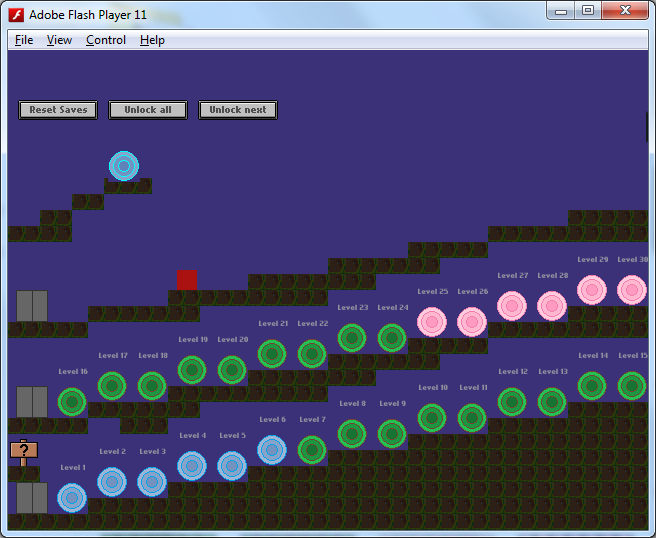
Notice the elevators? I was looking at the folder where all the images are stored and noticed the elevator door was just too plain. I made it look fancier and not only that! The elevator will now light up depending on which floor you are at. Surprisingly, I did not face another drawing problem. I know it’s not that realistic yet, because the doors aren’t animating (they do not open / close), but maybe in the future if it’s not too difficult, I will see if it is possible to add animations, though I’m actually not intending to do that at all now.


Adding levels

It’s 4.57am and I think I am going to sleep soon. Today, I was quite tired and slept my evening away. When I woke up though, I continued to add levels 22, 23 and am now trying to revamp level 9.

Level 9 is a level where the player witnesses an Enemy and a Friend in the same level for the first time. I wanted to portray how one’s enemies can turn your friends into your enemies. I called the function backstab() where it checks whether the enemy has touched any friend on the map, and if it has, kill the friend, and spawn an enemy on the exact spot. Sounds kind of cruel, but anyway this is an important level that I thought I should give it greater emphasis. I’m designing the level again and probably move the old level 9 somewhere else or delete it because it is too easy and pointless for now.

Hopefully tomorrow when I wake up, I will be able to at least finish some more levels. And after that it will be an exciting moment of adding Portals 31 to 45 on the third flight of steps! Currently there are only 30 portals, and I can’t wait to open up all the portals haha!

Tada! My extraordinary Level Selection Screen

This is the level selection screen. The character is represented by a red box. I initially wanted a plain “click to enter level” style of level selection. But I sort of screwed up with the coordinates of the Buttons, and accidentally made each button a little lower with each new level button unlocked. This made every new button appear lower on the screen than the previous button, forming a flight of steps, made of buttons! It was then that I thought it would be cool to have the level selection screen be represented by a player moving to doors that get increasingly higher.


I thought it would be applicable to use a flight of steps, since it means climbing higher, which is what it should feel like when advancing the levels. I also then added the player, and I also wanted to make the steps go down when it came to the later levels because life isn’t always going up. However, I think I have some space constraints and sadly I can’t make steps going back down unless I use a camera system, which I think is lots more hard work because it involves some side-scrolling! I don’t intend to implement a side-scrolling feature in this game.


The portals can animate (they currently animate by glowing). But even the animating of portals were not planned too. Before animating my player, I wanted to animate something REALLY simple, something that does not walk, does not jump, does not fall, so I chose the portals. I wanted to make them spiral, make the outer rings disappear, but among the sprites I made, I think none of them looked good. I settled for glowing portals in the end, which till now I still find they don’t look good but at least they are less boring than plain old portals.

Current Progress
The flow from level to level is still incomplete though, as some levels are simply blank – without platforms or enemies or the like yet. I also have to remind myself to remove the 3 cheat buttons at the top once the game is complete.


AI
I think the thing I am most proud of in this screen is the AI. Being able to click on the portals and have the character automatically move to them. This was the most challenging part. At first, I was okkayyyyyy…how do I do that? How do I make the character automatically know WHERE to go based on WHERE the player clicks? I had to really figure out what would be the best way to tackle this.


It was really tough for me. I think it took me an entire night to get the basic AI working, with bugs, and it took me another night to fix all the problems with the AI.


I started by making an invisible number called “floors” which increases every time the player ascends, and goes down when the player goes down. This was more effective than checking how high or low the player is on the screen, accurately keeping track of which floor my player is at.


Then I would check for user input and get the on screen X and Y values. Based on where the player clicks, I check if the click falls within the boundaries of any portal. If it is, I trace the coordinates to get the portal number.

Now the AI has a goal. But it does not know how to get there! It also does not know whether it needs to climb up, down, or whether it’s on the same floor.

That’s when the “floor” number I created became really useful. If my goal is level 1 to 15, my target Floor is 1. If my level is 16 to 30, my target floor is 2 and if I am not at my target floor, I move LEFT until I reach the elevator (indicated by grey doors), where I go up or down by comparing my currentFloor and targetFloor.

Once at my target floor, I move right and constantly check if I have passed my target portal. I will jump whenever the platform I am standing on is lower than the platform that my target portal sits on. Finally, the character reaches the target portal and enters! YAY!

This is the first time I attempted AI pretty much on my own without any help, so I am greatly impressed with the results. It may seem as though the coding is easy, but I had so many problems! For example, I could not get the character to move left or right at first, and I could not make it automatically jump too! There were also problems where after it jumped, it would jump even when I just want the character to move to an adjacent portal that isn’t a step higher.

After completing the AI, I felt really happy that while it took much more effort than a point and click screen, I think it is far more interesting and way worth the effort.

The last thing I added was the ‘automatically enter level when AI moves to door’, because I just wanted to play around with clicking the portals and watching my character jump here and there without entering any level. It was really fun, somehow, watching the red box jump around. It was really rewarding.

Sleep
I guess it’s time for me to sleep now =(. Hopefully I can at least get the last of the levels to work and move on to creating and designing the pink-theme portals! The levels I will not do for now are 18, 19, 20 because I have something planned for those levels in the late-game.

Thinking back on the work I have done makes this so much more exciting.

Blog Created!

Hi all~
Today, I just had this sudden urge to want to post my progress on creating the game “Introvert” on a blog. I actually did not intend to use a new blog, but my personal blog is too private to make public, and my gaming blog is simply too casual to use for a semi-serious “developer’s blog”. Thus, I created a new blog!

Background of “Introvert” and me
Introvert is my very first Flash Game that I am working on, and I am very excited about making it! I started progress on 9 June (it is 21 June today). I remember struggling to learn ActionScript 3.0 on my first day, a completely new language to me, as well as trying to work with Flixel, a completely new Game Engine that I heard was recommended to beginners like me ^^.

Since then, I have been working on the game for 0 to 12 hours a day. I think my progress is somewhat decent since I have somewhat managed to successfully learn a new language and have a running, working game in just two weeks on an engine I have never used before.

I created a log/ journal that covers what I have done since my first day. I update it almost daily. Again, because this is my first project, I am actually very enthusiastic and excited, and hence it explains why I kept a log (when you read it, it may seem a bit impractical, but I was really keen to log my progress). The resulting excitement also made me create a blog, just because of it!

Well, here’s the log that tracks my progress. If you do not wish to read the log, you can skip to the end by using CtrcF and typing “log end”.

Game Progress
“log start”
9 June
– Game Project Created
– Has a PlayState only
– Added levels 1 through 9

10 June
– Main Menu State added
– Added levels 9 through 13
– Added level selection state, with buttons to enter levels
– Created enemy class
– Tile Graphics updated and revamped
– Game Resolution no longer scaled by 2
– Level 7 onward platforms changed to forest theme.
– Player Sprite drawn
– Game Logo created, but not used yet

11 June
– Added levels 16 through 17
– Level selection state now has player, has doors and elevators
– Level selection state buttons removed
– Added a Save feature, but buggy

12 June
– Fixed bug with save feature. Save now works
– *Pathfinding added for Level selection state
– Level selection state portals added, animations for portals added
– Added pink portals

13 June
– Added level 21e and 21p (there are two versions of this level)
– Player size changed from square to rectangle
– Pathfinding AI slightly smarter, some AI bugs resolved
– Design modification: Removal of collision between enemy and player w/ Endurance
– *FINALLY SOLVED ENEMY MERGE BUG when chasing
– Enemy movement much smoother
– Forest cutscene added, Forest animation frames added
– ForestState added
– Added level 12
– Added Main Menu Graphics, Play Button
–  I finally solved the enemy head to player collision bug. This bug went on for days, frustrating me. I had no idea on how to solve it. I had to abandon collision with enemy altogether because of this. But today, I solved it. At 5.56am +8 GMT on the dawn of a quiet Thursday morning, I finally solved it.

14 June
– AI movement after collision is smoother, reduced overlapping and loss of collision
– Created level 26, 22, 14
– Girl Player Class added

15 June
– Solved the Jerking Bug where player jerks whn collcting a fren on the left. I was damn happy. It was caused by putting makeGraphic in update(). It should only be in create.
– Added Graphics for the Player. It’s buggy now though.
– Solved timer class problem for achievemnt state. Solution: start the timer at 3 seconds, and check if its timer.finished

16 June
– Player now dies touching giant spikes on level 24. Previously he walks through them unharmed.
– Design decision/challenge: Change all box sprites to turtles by the end of Friday 22 June. Now time to sleep.

17 June
– Scaling up works for 32 x 16 upward (scale down bugged)

18 June
– Level 14 enemy can now jump: Solved by repositioning super.update()

19 June
– Turtle can now turn and animations are all completely working in AchievementState
– Turning solved by setting to FlxObject.LEFT instead of FlxSprite.LEFT

20 June
– Added level 25, 27, 28
– Turtle graphic 10 x 20 version drafted
– Enemy graphic decided! It will be an angry turtle, 16 x 20

21 June
– Added Aggro for enemy
– Level 13 realism adjusted (again)
– Added AI movement for level 28, ghost sprite added
– Added idling for AI
– Level 28 semi-advanced AI completed

“log end”
As of now, I have 30 portals (representing levels), of which 23 of them are levels that have already been created. I initially intended to have about 20 levels, but it seems that my levels are actually very easy and quick to complete, and also I realised that I needed to have more levels to make the game more complete. My current estimation of the total levels needed has raised from 20 to 50, which is more than TWICE of what I initially wanted to do!

I also started adding more features than I initially had. I suddenly had a pathfinding AI, I suddenly had an interactive level selection screen rather than a point and click screen, I even added an achievements system. Even in school today as I was watching an educational “Up Your Service” video, I was still thinking of ideas  and sketching them on paper.

Some of my new ideas are:
– Doors that can move a player from one platform to another. If possible, create an animation for that.
– A dynamic platform that can be used as an elevator.
– Walls that are impenetrable, but can be disabled with buttons.
– Buttons on the map that can be pushed by jumping on them.

I think the doors will be the hardest to code, because of the animations >< If the player presses DOWN to go through a wall, I want the player to animate entering the door, and then animate moving out of the second door. I have no idea how I am going to do that, but I think the door itself will be animated with a turtle walking in and out. I have to figure out HOW exactly I am going to make the player temporarily "disappear" from the map while the door animation plays.

How I feel so far
At the start of the project, I was extremely excited and motivated. Gradually, at times when I got stuck on bugs and problems, I started to falter and thought of giving up :(. I was aware that I should not be facing these types of problems since my friend (who is also a programmer), said that they are considered to be quite “easy” to solve. It was somewhat demoralizing, but occasionally, I get small boosts in my motivation and some assistance that got me going. I have managed to survive this long and I hope that this project does not end in failure.

That’s all I have for now. I will be posting very frequently while my enthusiasm remains high ^^

Oh, and for history’s sake, I expected that this project be completed in ONE MONTH. However, seeing how I started implementing much more in the game, it seems like it might actually take two months. That’s my estimate though, and while I think other people could actually complete a platformer in a shorter time, I don’t think I’m as good as them, so maybe I’d be able to do it in two months maximum I hope.