Long time no see

15 March 2013 – Long time no see

It has been a very long time since I could get time to progress on my game. Progress had been stopped for nearly half a year. Been extremely busy and tied down with so many things. I’m glad that today I have finally been able to continue working on the game after what appears to be months. Hopefully, I will be able to continue working uninterrupted on Introvert every week, and every day if possible.

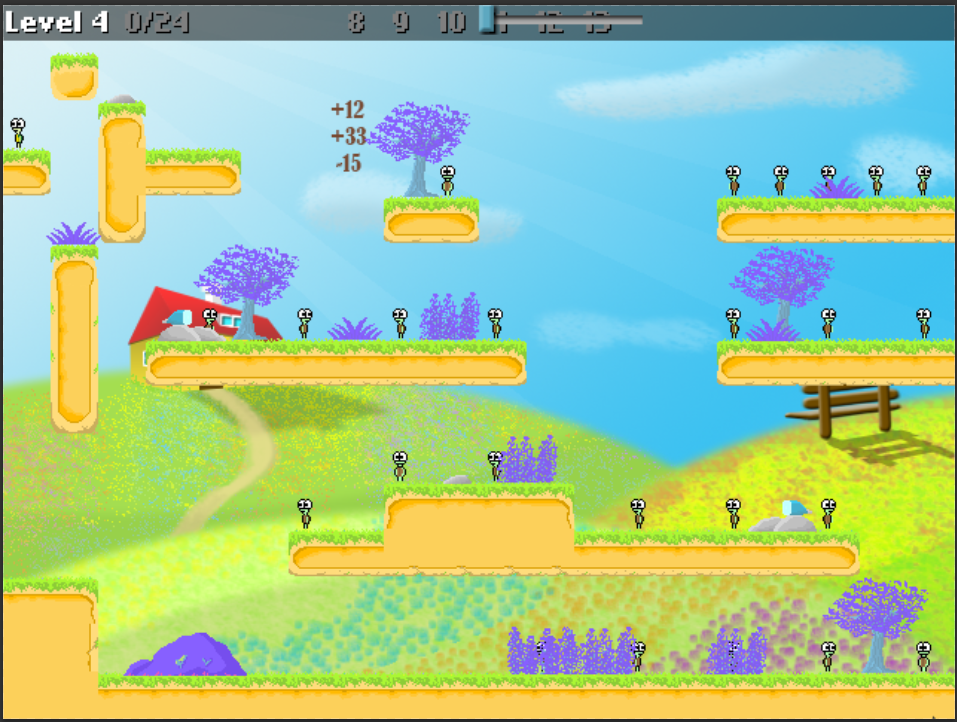
What I will be doing for the next few days would be to re-adjust all the text size and positions in the game. As I have incorporated the camera zooming function (with Li Hao’s help!), each level has its own zoom level to make levels visually better. The zoom is manually set to a certain value, depending on the level. I try to make it as nice looking as possible. But with each level having its unique zoom level, it also means that having a constant text size means the text appears big on some levels and small on other levels since I don’t attach text as part of an interface.

Honestly, I hate having to manually play through my levels again and manually set the size and position, but it’s something that is on high priority on my to-do list now. Thankfully, I thought of a code that made life easier for me.
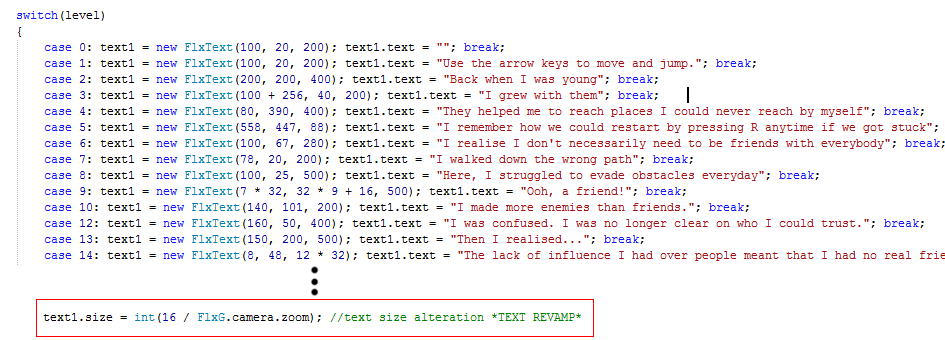
This simple line will readjust the font size of all the text that appears across ALL the levels. 16 is the default font size on 100% zoom. On 200% zoom, the font size will be 8. It is inversely proportional so the higher the zoom, the smaller the text should appear to the camera. This works perfectly!

But I still have to change the x,y positions of every level’s texts AGAIN! That’s something I can’t cheat haha. This may seem like a relatively simple task anybody can do, sorta like QA, but I don’t know anyone who would bother to help, so I guess I’m on my own!

Blur problem

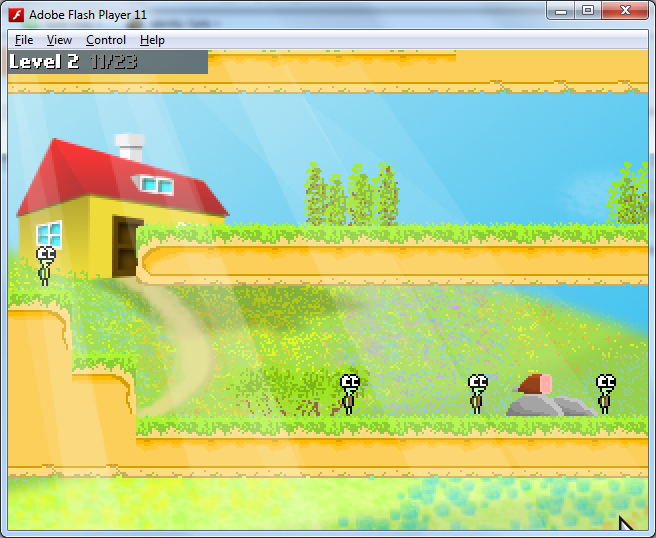
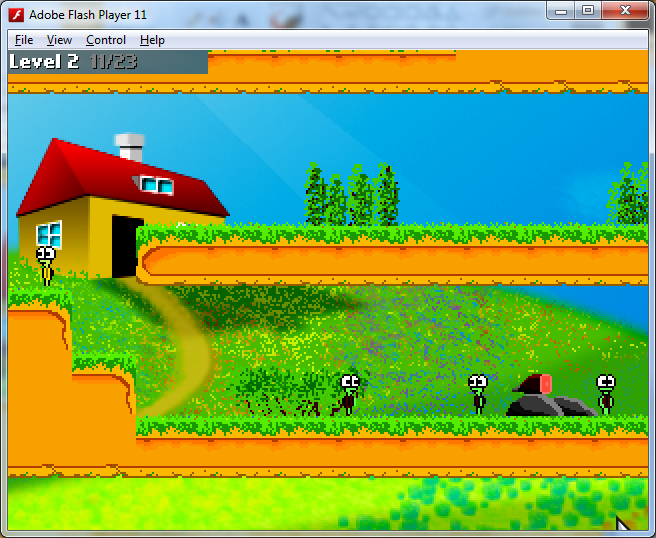
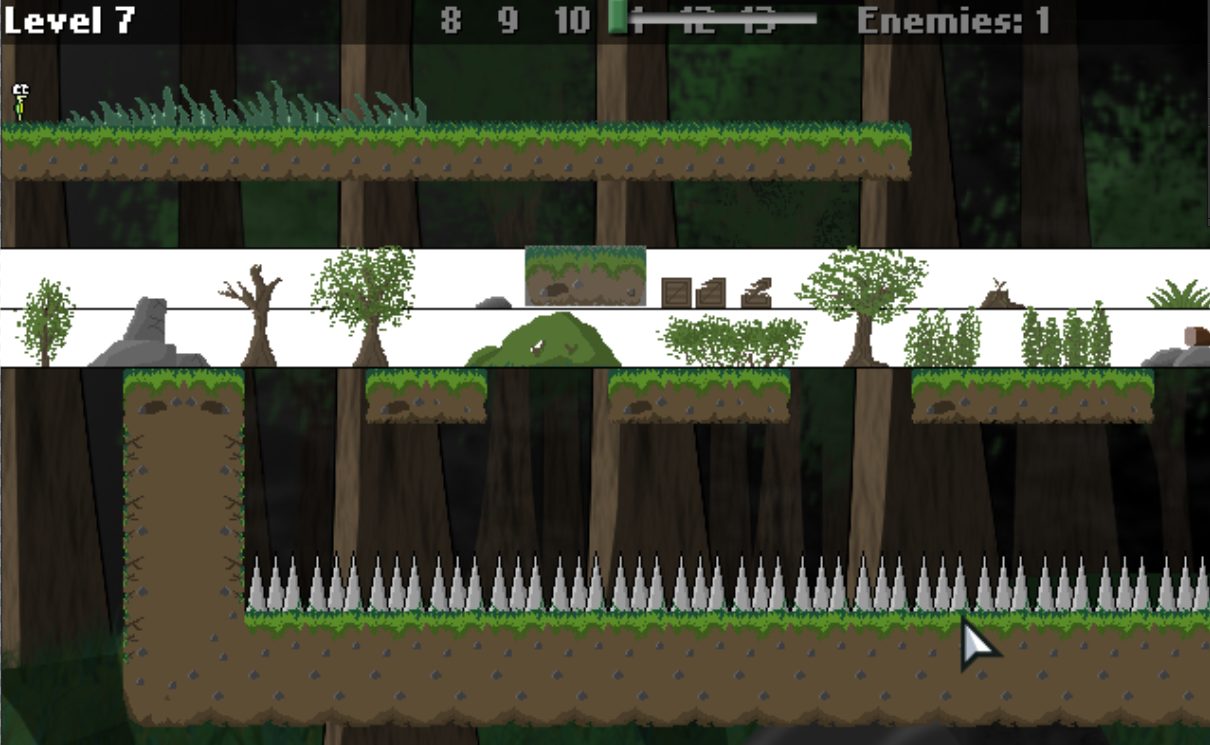
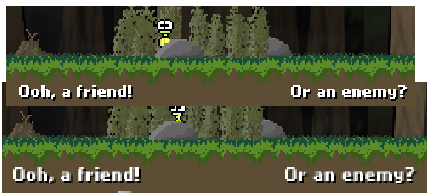
As I began to go through my levels, I noticed that the implication of zoom led to my text being blurred. I did not like it at all.

I decided in the end to round off text sizes to the nearest power of 2 as it would a bit better with bitmap based text. So most text sizes are now 8, or 16 in the game.

In one such level below, you can see the blurry text (bottom) and the new readjustment(top).
Reflection (Additional info, not development related)
This is just some additional stuff I want to express.

Through this project, I learned quite a fair bit of things. My companion, Li Hao, said that even if I don’t manage to complete this game and have an output, I would already have learned a lot. Indeed, I began to realise the consequences of not planning my schedule properly. It led to much delay, which is why I have been trying to tell myself not to add too much content into this game, or it will indeed not be finish-able.

Today is the start of another phase of development. From now till next month, I will focus on fixing whatever flaws exist in the game before adding additional content, like new levels, new cutscenes and bonus content which I had always been excited about.

I kind of reflect about stuff like this everyday, even when I don’t work actively on the game. It is quite fun, though I still hate planning because it requires lots of self control and time management. If someone could teach me how to plan a good schedule for me, that would be great. But that’s something I have to learn as I go along.

Just A Short Story

Monday, 31 December 2012

It has been an awfully long time since I last posted something, much longer than I wanted to.

I am not working full-time on the game for now because I’m not on holiday yet. But I did create a cutscene level for the game and set each level to start with a specific zoom. I also made hover-pop ups that appear when you move your cursor over the difficulty level buttons. For example, hovering over the “easy” button shows what the easy difficulty does. Basically, I did simple stuff.

That’s all I did for the game for the past weeks.

I created a .gif animation in the past two days for leisure. I called it “Just A Short Story”. And even though the animation is just a short story, it actually has a lot of meaning in it.

This is the animation I created. It is one of my early gif animations. I hope to learn tweening to be able to do smoother movement transitions. It was done frame by frame and pieced together.

Just A Short Story – It may just be a short animation, but it tells a meaningful hidden story.
Unfortunately, uploading the huge version of this caused some problems. I compressed it to a much smaller size and it displays fine now.
—–
For those interested in the story of the animation, it goes like this:
There lived an independent turtle. But he was sad.
One day, another turtle came up to him and offered to be his friend.
The two of them played together.
They chased each other.
They ate together.
And had fun together.
But the turtle’s friend decided to be with his own friends, and left him.
The box represents the memories and times they had together.
The box is closed and locked because the only person who can unlock and open the box is his friend. He had grown dependent on his friend for happiness that only his friend holds the key to unlocking the box.
But in reality, he knows that the memories can never be relived. No matter how much he misses those memories (he hugs the box), he knows it is impossible to go back to those happy times.
He expected the friendship to last longer, but it turned out to be just a short story. End.
——
The animation consists of 6 main story boards, but I animated them much more than I expected to, with the fancy title appearing one letter at a time. (I manually type one letter at a time and save it as one frame, then type the letter, then save it as another frame). Tedious, ain’t it? I considered coding it in Flash, or even better, start actually learning to use Adobe Flash Professional, but decided against them.

Zoom function and Slider

21 October 2012

I gave the latest version of the game to Li Hao to try and I took note of the really good comments he gave from his observations of what I added recently.

– Jumping sound is not synchronized with the player (we decided it was best to remove the sound altogether after analyzing several games – the problem is that the character has many animation frames and it would require a very proper sound to match the frames, plus a sound is needed for when the player touches the ground which complicates things)
– Trees in foreground should not move (they move because I attempted to do a 3D parallax scrolling effect in which objects in the foreground move faster than those in the background, but failed to create a very good visual effect. Thus I have removed it.)
– It would be nice if the turtle speaks more (the speech bubbles currently use the same text)
– Forest level rocks do not fit with the game style (hmm, maybe I should remove the rocks? But what can I use to decorate the soil?)
– Enemy growling sounds are funny, but gets annoying after a few times (I tweaked it eventually so enemies only growl once in their lifetime – at the moment the enemy’s aggro is triggered)
– Levels with high zoom are irritating sometimes. (Fix zoom levels ASAP!)
– Li Hao said he really like the door sound effects (I was really pleased to hear this)
– Decorations make levels a lot better (this made me really happy too!)
– Pressing UP key at Elevator contradicts with game’s standard pressing DOWN key to use portals (this has just been corrected)

Also, not a comment he made, but there was a flaw with my bonus level where the turtle collects a picture. If the turtle dies directly after collecting the picture, the bonus level is reset and the picture disappears. It is not a bug but is something I don’t want to happen, so I prevented the player from falling off edges and dying on that bonus level.

Every time he gives me comments, I have a lot to tweak, but I am really thankful and happy for these comments! I really need more comments and testers to find flaws in the game that need tweaking if I want this game to work out well.

It’s very important to constantly seek opinions and comments to make adjustments to whatever flaws exist and remove them early, rather than keep adding stuff excitedly and realizing at the end that there is a big list of things that need to be fixed and corrected. Now that would be really demotivating.

20 October 2012

Today is quite an exciting day! At the end of the day, I have finally managed to create a working slider that affects the zoom of the game. By sliding the bar to the left, the game is at 1x zoom. When it is moved to the right, it slowly increases to 4x zoom!

I actually opened one of my long notepad documents and played around with their slider to figure out how Microsoft actually did their sliders, because I was experiencing some problems with my slider’s functionality. My slider required precise movement of the mouse, and when the mosue moves too fast, the slider is unable to catch up and stops following the mouse.

Another one of the other problems was that the coordinates of the mouse is constantly changing with the different zoom levels. When Flixel zooms, it zooms from the middle. So the origin at the top left isn’t (0, 0) anymore. The x and y become negative. And the slider depends on the mouse’s coordinates.

I managed to fix the issues, so the slider isn’t so restrictive. It works absolutely brilliantly now! I also fixed a bug with my elevator animations not playing properly. Today was pretty much fixing areas in the game which were problematic. I learnt quite a fair bit today.

Backgrounds

Saturday, 20 October 2012 – Backgrounds

I’ve been working on the LevelEditor today. I managed to get the save feature finalized, but the problem lies with exporting the level in the editor into a real working and playable level.

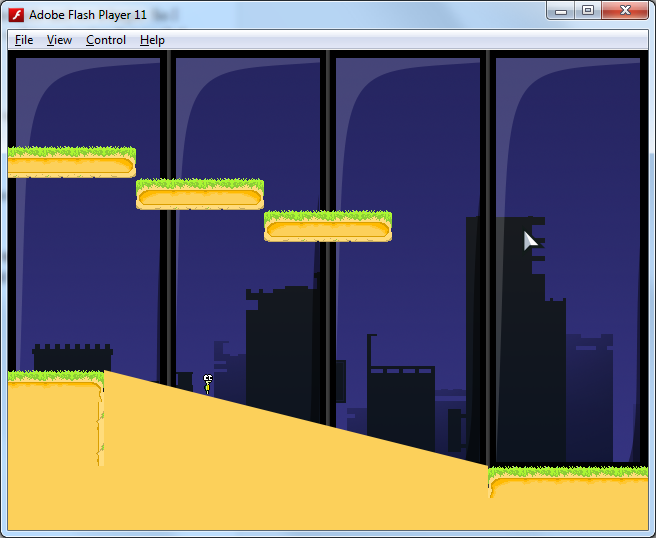
I also spent a lot of time today creating a building level. It is a very tall map with moving, slanted platforms. It is really cool in action.

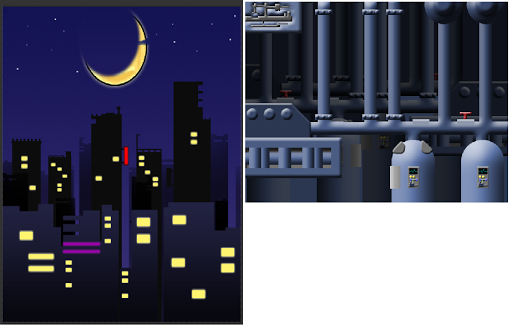
I also drew three new backgrounds recently.
1) Factory background
2) Tall Building background
3) Night City Background (tall version)

Images above are scaled to fit this window.

I also added decorations and special effects onto one of the bonus levels – the rooftop. When the player reaches the rooftop, there is a spot on the map that glows. When approached, it triggers a picture to appear. Some effects are accompanied with the picture. I’ve tested it repeatedly and it works great.

That’s all for the progress for yesterday and today.

Oh, I drew a popup too:

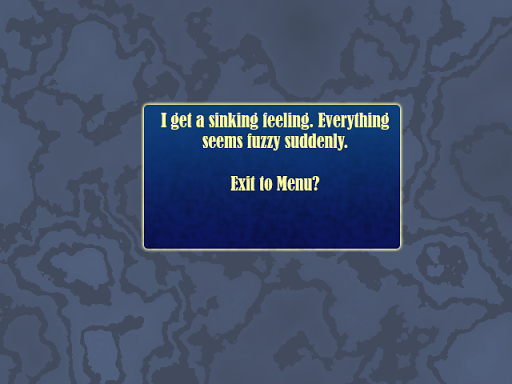
This is a draft popup that may or may not be added to the game. Right now, pushing the ESC key during a level returns the player to the Level Selection screen without any prompts.

I most likely am not doing a pause state, since the game does not need one. But a popupconfirmation before returning to the level selection screen might be useful.

Week 6 of Introvert

18 October 2012

I have been working on a few things recently. Some of the new features I have added into the game are really exciting!

Decorations
Decorations seemed like a really fun thing to do at first. I created a file with all my separate, individual decorations. And then I open another file with screenshots of my levels, and slowly copy and paste the decorations there.

Now, it seems like a simple job, but then it actually needs quite some work. I need to use adjust and place each decoration of a level properly – to make sure they aren’t floating above the ground, and to make sure they are attached properly. I have two layers of decorations – a foreground layer that covers the player, and a background layer that purely decorates the level.

Decorations was a matter of slowly placing the right things properly, at the right place. But other than that, I realised that I had to draw rocks too. Apart from placing decorations on platforms, there are LOTS of empty spaces INSIDE the platforms. The tiles themselves are pretty plain. I had to draw the rocks inside them to make sure the tiles looked good as well. I couldn’t really get any inspiration for rocks, so I had to make do with what I could do.

I did this for a few levels, and very soon, I realised I needed more than a few days to finish up the decorations. Why? Because I had lots of levels. And I would have to decorate each level…one, by one, with each level containing three layers of decorations – the foreground deco, the background deco, and the rocks.

Oh man…this is the time when I seriously really want to ask some people for help.

I managed to decorate 20 levels in two days, including redrawing plenty of new decorations that really add value to the visuals on the levels. I really like the decorations.

Also, the tiles have been touched up slightly to remove unsightly areas.

New Feature: Speech Bubbles!
This is something I added today. I had been thinking about the logic behind this before I did it, so it was pretty simple and straightforward to do. The speechbubble looks like a single image, but it actually is made up of four sprites. I could use a single sprite, but I would not be able to change the length of my bubble smoothly. I can stretch it, but that would distort the edges, and it would look ugly. That was the first problem I had to tackle.

The speech bubble can have varying width. Thanks to Flixel’s scale.x which I used for the center sprite, I can change the length of the speech bubble to anything I want. I just needed to calculate the coordinates of the origin of the speech bubble, and base the other sprites’ coordinates off the origin.

The bottom sprite was quite tricky to do, because if the player were to go to the sides of the screen, the speech bubble has to stay within the screen, and the speech bubble has to look sensible. I made the fourth sprite detached from the speech bubble and made sure it was kept at a minimum of 2 pixels’ length away from the player’s head in either direction. If it got too close, it would flip and the coordinates would be recalculated to be on the other side.

After doing that, I found it really fun to play with the speech bubble and watching the triangle slide from left to right.

I also created a very simple function to make my life easier. In my design, I needed the speech bubbles to simulate a conversation. If I specified the speech bubble to hold more than one text, text on the bubble would change after a period of time, in the correct sequence I want it to be, and would disappear when the last text is shown. I also want to be able to control the duration of each text shown. I don’t know if there is a better way to code it since I’m still quite new to this, but this was how I did it. I have a function called “addText”.

public function addText(_text: String, _duration: int): void
{
textGroup.push(_text);
durationGroup.push(_duration);
}

In my speech bubble class, I had two arrays:

public var textGroup: Array;
public var durationGroup: Array;

They keep track of the text and their respective duration on which they stay in the speech bubble. Once the text is shown long enough, I access the next index and this goes on until all the text is shown, after which I close the speech bubble.

In my update, I put:

                         if (timer.finished)
{
if (textGroup[i] != null && durationGroup[i] != null)
{
text.text = textGroup[i];  //the text to display
timer.start(durationGroup[i]);  //the duration the text is displayed
i++;
}
else
{
disappear();
}
}

I tested the speech bubbles and it works perfectly! I’m really glad I managed to get this feature done pretty quickly (within one day for a working speech bubble with customizable length is very satisfactory to me). I had some really scary thoughts of problems with this feature, but it went smoother than I expected.

UI Additions
I added two new buttons to the UI.
1 button toggles special lighting – simulate sun going behind clouds and darkens level at intervals
1 button restarts the level, as an alternative to pressing “R” on the keyboard.

New Maps
I created three new maps which I called bonus levels, which are actually extensions of the level selection lobby branching out. I love the decorations on one of the bonus levels. I spent many MANY hours doing the decorations for that level, which is actually just a level which players walk past. Not exactly the best thing to spend time on, but at least I had fun drawing.

Level Design
I took a look at one of my levels that was flawed by player feedback. The levels that introduce the new Door mechanism to players was vague.

I also dug through my papers and level sketches and started to plan the sequence of levels. I also created drew out the sketches of new level ideas I had when I was in my bed. I can’t wait to implement them once I am done fixing all current issues in my never-ending to-do list.

Sound Effects
I also started sourcing for sound effects needed for the game. I found sounds for jumping, collecting friend, door opening and closing, button presses, enemy growling and achievement unlocking sounds.

I only managed to implement a few sounds in the game, and I realise some sounds don’t really fit, so I have to do some editing or find other sounds.

What a busy holiday!

Blend Modes?

13 October 2012 – Blend Modes?

I added some stuff over the past two days, namely the addition of blending modes and an attempt at dynamic lighting.

Normal Mode (with Rays of sunshine)

Overlay Mode (Sun behind clouds)

I added some sun beams that are on the front most layer. I have three layers in the game now.

The top layer being sunbeams and some decorations that pop out of the platforms.
The second layer being the layer with all the platforms and most ordinary decorations and props.
The background layer which consists of the background. Flixel, the engine used, has something called scrollFactor which I found to be very incredible. I set the background’s scrollFactor to 0.5 so the background moves with the character, but at a slower rate. Previously, the background was just stuck there as a static, immovable picture. Now it has a cool scrolling effect that makes the game look like it has depth.

Unfortunately, I think the overlay mode needs tweaking since it does not seem to look very fantastic. If I can’t get it work, it might have to be removed. I added an invert mode for fun. Might add it to the final version as an additional achievement reward.

Invert Mode

Turtle Animations Renewed

11 October 2012 – Turtle Animations Renewed

Renewed Turtle Animation
With the recent zoom feature, I realised it was very easy to zoom in onto the turtle and see it larger. So I decided to work on improving the animation frames further. Other than the walking animation that needed improvement, the rest seemed fine, so I just redrew the walking frames. I also improved the idle frames slightly, altering a few pixels that seemed out of place. This change was done across the 10×20 px and 16×32 px version of the turtle, so both walk animations look very great now. They also play at 9 frames per second compared to the old 4 frames per second, so it looks fantastic now.

I also added a new bonus animation that plays only on certain levels. This bonus animation has many frames (and lasts a little longer than the other animations), so it has to be quite unique. It’s sort of like an extended idle animation that “replaces” the old idle animation. This is used for later levels, if I do get a chance to add them.

Zoom and UI Fix Progress?
The biggest problem I face now would probably be getting the UI to show up on the screen and not move with the camera. I’ve been working on that today with no promising results.

Difficulty Modes
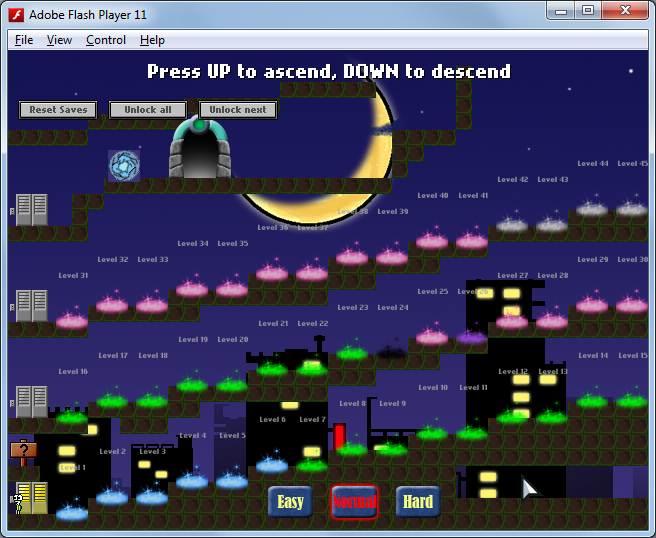
I started implementing difficulty modes today, along with the buttons to select them. The difficulty modes are also “saved” so it will stay on the difficulty the game was last set as even after entering, and leaving the levels. For now, the difficulty modes are at the bottom.

The level selection lobby does look quite squeezy now with the recent additions. I might really have to create  a camera for the lobby and extend the level more than 480 pixels in height. That’s something I’ve not done yet, and I’ll have to figure out how if I intend to add more stuff here.

Slopes
Lastly, I also added slopes (platforms) into the game. The levels are made up entirely of tiles. I just created a new test level to test the new slope that I’m adding into the game. But I am going to make the test level an actual bonus level.

More Graphics Improvements & Revamps

10 October 2012 – More Graphics Improvements & Revamps

Decorations restarted
I took a look at some of my decorations and utterly feel like redo-ing them. They don’t look up to standard sadly. I am back to square one, and am considering not to use bitmap graphics. But doing that means I have to redo all my current tiles and platforms, something which I tried to do a few days ago, but had no luck with.

So today I started by redrawing the trees, but I have not updated the levels with the new decorations.

Elevator Doors Improved
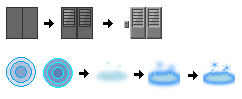
I also improved the elevator doors. Having revamped the portals a week ago, the old elevator doors needed to be improved to match up to the increased quality of the revamped portal graphics. I also added a tiny buttons panel next to the elevator doors just for additional details.

The game has undergone quite a lot of graphical changes. I remember the old portals used to be circular.

I will also create an animation for the elevator doors to slide open and close when the character uses them. This is a bit tricky to do since it takes time for the elevator doors to open, but there is no delay for the player to use the elevator. So the doors have to open really fast or else it will look like the player is entering an elevator with closed doors.

Edit: I have now done the opening and closing animations and they are somewhat functional with a bug that I am trying to resolve. The bug is that the elevator doors repeatedly loop and play the “open” animation whenever I’m standing on it. It’s supposed to open once and stay open while I am standing on its area. I remember encountering this bug when I first created the brown doors in the levels.

Bonus Areas
I added a bonus area in the game. It’s a secret area that can be accessed through the basement and has a certain requirement to enter. The secret area can only be accessed once though. This secret passageway links the level selection lobby and the basement together. I added a key and some blocks to the level selection area as well. Oh, there is also a dimensional portal in the new Level Selection lobby as well! It is a very interesting portal.

Decorations!

9 October 2012 – Decorations!

Over the past week, I had been creating several decorations that I thought could be used to beautify and visually enhance the map so the platforms and tiles don’t seem so monotonous.

These are some of the decorations that were created. The black line marks the 32 pixels in height. I made most short trees and bushes cap at a height of 32 pixels  which is necessary because that is the width and height of one tile. Taller trees go up to 64 pixels and are two grids tall in height. All decorations adhere to the heights I set.

I placed the background behind so I can create decorations that more or less fit into the background. Or else I might end up getting something like this:

I was playing with the colours of the decorations. The decorations in the above screenshot has largely exaggerated colours. I got some pretty cool ideas along the way, such as a map with autumn when I adjusted the leaves to red. It was really fun playing with the colours while trying to match them to the background. There was also the problem of the decorations having insufficient contrast with the background, especially when everything is so green in this background.

The decorations were manually dragged in from a file containing all the decorations. I also need to tweak the decorations after testing the levels again in case the decorations are “floating” above the grass when I inspect them on a high zoom level.

I hope to improve the decorations if I have the time to.

Rocks
The latest new feature is the ability to throw rocks. Toward the end of the day, I decided to work on this feature. Rocks can now get rid of enemies, and destroy spikes. I also fixed a bug where the rocks were invisible (so basically enemies and spikes were disappearing for no reason before that). They can also destroy tiles! Bugs arose of course – with the wrong tiles being deleted, but I have managed to fix all the bugs in the feature surprisingly quickly.

I also generated a mini-game idea based on the ability to throw rocks. It is a very ambitious mini-game though, so I might end up not doing it.

Keys
I drew new frames for the key object in the game, effectively doubling the number of frames to make it look like they spin 360 degrees instead of the previous 180 degrees. They now spin more realistically than before.

Main Menu Transitions

Saturday, 6 October 2012 – Main Menu Transitions

Credits Page

When creating transitions from page to page, I think most people would probably do a motion tween. I suppose that is the most efficient and quickest way to create a transition. I’m not sure how to do it in games unfortunately. I thought of generating a spritesheet, but I do not know how to use Adobe Flash yet and that seems like a crazy way to do it to.

So, I coded the transition!

I have a camera man in my Main Menu. Yes, he literally is my cameraman. I code the game’s camera to lock onto this camera man and follow him. The cameraMan is an invisible sprite at the center of the screen when the player doesn’t click any of the three buttons. When a button is clicked, it triggers a particular action of the cameraMan. He has three actions.

The first action is run. He will run to the right, and the camera follows him running to the right. This is one of the simpler transitions.

The second action is fly. This is what I just coded. It is a bit complex and has some luck involved because I have to do lots of testing of values. I basically imagine the cameraman pretending to make a high jump. He squats (velocity drops), and then lungs into the air (acceleration upwards). Then when he reaches the top, I apply gravity (acceleration downward). Once he reaches the center of the new screen, I set his velocity to 0. Tada!

I didn’t really name the third action. I coded this in the past. Basically it’s a transition when the play presses Play. This is the coolest transition in my opinion. Haha.

The Main Menu is a very special menu, because it contains tiny secrets. You should check out the credits page and explore the Main Menu. The one in the credits page is pretty obvious for now though. I plan to make it a bit harder to find it. I already have an idea how to.